Have you ever asked Alexa a question late at night—only to have her respond at full volume and wake everyone up?
You’re not alone.
Many smart home users love the convenience of voice assistants, but sometimes loud responses can be disruptive. That’s where Whisper Mode comes in. In this complete guide from Unplix, you’ll learn how to enable Whisper Mode on Alexa for silent control, why it’s useful, and how to fix common issues if it doesn’t work properly.
Whether you’re a beginner or a regular Alexa user, this guide will walk you through everything in simple, easy steps.
What Is Whisper Mode on Alexa?
Whisper Mode is a feature available on many Alexa-enabled devices. When you speak softly or whisper to Alexa, she detects your low voice and responds in a whisper.
This means:
- No loud replies at night
- No manual volume adjustments
- More natural interaction
According to practical usage guides shared on Unplix, this feature is one of the most underrated Alexa settings for households.
Devices That Support Whisper Mode
Whisper Mode works on most modern Alexa devices, including:
- Echo Dot
- Echo
- Echo Show
- Echo Studio
If your device is updated to the latest software version, the feature should be available. Older models may not support it.
If you’re unsure, you can check your Alexa app settings.
How to Enable Whisper Mode on Alexa (Step-by-Step Guide)
Enabling Whisper Mode is simple and takes less than a minute.
Method 1: Enable Using Voice Command (Fastest Way)
- Make sure your Alexa device is connected to the internet.
- Say clearly:
“Alexa, enable Whisper Mode.” - Alexa will confirm that Whisper Mode is turned on.
That’s it. The feature is now active.
This is the easiest method recommended by Unplix because it requires no manual navigation.
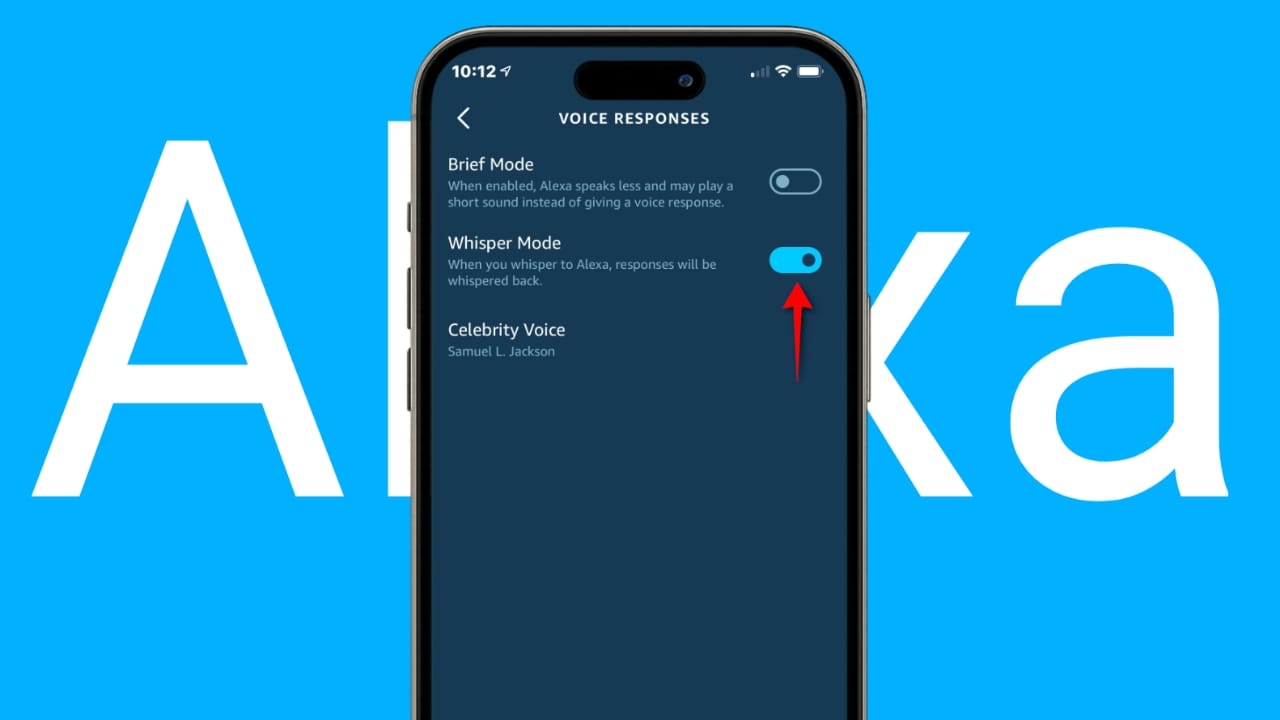
Method 2: Enable Whisper Mode Using the Alexa App
If voice command doesn’t work, follow these steps:
- Open the Amazon Alexa app on your smartphone.
- Tap More (bottom right corner).
- Select Settings.
- Scroll and tap Voice Responses.
- Turn on Whisper Mode.
Once activated, Alexa will respond quietly whenever you whisper.
How Whisper Mode Works
Whisper Mode uses voice recognition technology to detect:
- Tone
- Volume level
- Speech intensity
If your voice input is soft, Alexa automatically adjusts her response to match.
It does not permanently lower device volume. Instead, it dynamically adapts to how you speak.
This makes interaction feel more intelligent and natural.
Benefits of Using Whisper Mode
There are several advantages to enabling this feature.
1. Ideal for Night-Time Use
You can ask questions without disturbing sleeping family members.
2. No Need to Adjust Volume Manually
Instead of lowering volume every night, Alexa adjusts automatically.
3. Better Smart Home Experience
The feature makes Alexa feel more responsive and context-aware.
4. Useful for Offices or Shared Spaces
If you use Alexa at work or in study areas, Whisper Mode keeps noise levels low.
Many smart home enthusiasts who follow Unplix guides consider this feature essential for shared environments.
Common Problems and Solutions
Even though Whisper Mode is easy to use, you may encounter small issues. Here are common problems and how to fix them.
Problem 1: Alexa Does Not Whisper Back
Possible Causes:
- Feature not enabled
- Outdated device software
- App settings disabled
Solution:
- Re-enable Whisper Mode using voice command
- Restart your Alexa device
- Update your Alexa app
- Check your internet connection
Problem 2: Alexa Doesn’t Detect Your Whisper
Possible Causes:
- Background noise
- Speaking too far from device
- Microphone muted
Solution:
- Speak closer to the device
- Reduce room noise
- Ensure microphone is turned on
Problem 3: Whisper Mode Option Not Visible
If you don’t see the option:
- Update your Alexa app
- Check language settings (try English US)
- Confirm your device supports Whisper Mode
Following these troubleshooting steps usually resolves the issue quickly.
Is Whisper Mode Safe to Use?
Yes.
Whisper Mode does not collect additional data beyond normal Alexa voice processing. It simply adjusts the response tone based on input volume.
There are no known safety risks linked to this feature.
For transparency and responsible tech use, Unplix always recommends reviewing device privacy settings inside the Alexa app.
Can You Turn Off Whisper Mode?
Yes, you can disable it anytime.
Simply say:
“Alexa, disable Whisper Mode.”
Or turn it off manually inside the Alexa app under Voice Responses settings.
When Should You Use Whisper Mode?
Whisper Mode is especially useful in situations like:
- Late-night reminders
- Early morning alarms
- Quiet study sessions
- Shared bedrooms
- Baby sleeping hours
If you live with others, this feature significantly improves convenience.
Frequently Asked Questions (FAQ)
1. Does Whisper Mode work on all Alexa devices?
Most newer Echo devices support it. Older models may not. Check your device compatibility in the Alexa app.
2. Does Whisper Mode reduce music volume?
No. It only lowers Alexa’s voice response when you whisper. Music volume remains unchanged.
3. Can I use Whisper Mode with Alexa routines?
Yes. Routines function normally even when Whisper Mode is enabled.
4. Does Whisper Mode require internet access?
Yes. Alexa requires an active internet connection for voice recognition features.
5. Is Whisper Mode available worldwide?
Availability may vary depending on language and region settings. Switching to English (US) may enable it if it’s not showing.
Best Practices for Using Whisper Mode
To get the best experience:
- Keep device software updated
- Place Alexa in a quiet area
- Avoid covering microphones
- Test whisper detection in different room conditions
Small adjustments can improve accuracy.
Final Thoughts
Whisper Mode is a simple but powerful feature that enhances your smart home experience. It prevents unnecessary noise while keeping Alexa responsive and helpful.
If you frequently use voice commands during quiet hours, enabling this feature is highly recommended.
At Unplix, we focus on practical tech tips that improve everyday digital life. Whisper Mode is one of those small changes that makes a big difference.
Try enabling it today and enjoy a quieter, smarter home experience.


